How to Make the Raindance AI Video With Two Photos
Quick answer
To make the Raindance AI video, open Raindance AI, upload two photos (the first is the one waiting on the pier, the second is the singer) and click Generate. In about 5-10 minutes you get the full 28-second, 720p, 16:9 love story with the song. It costs 1,315 credits at 720p (about $7.63), charged only if the video succeeds.
Open Raindance AIRaindance AI at a glance
| Video length | 28 seconds |
|---|---|
| Photos needed | 2 (the one waiting, the singer) |
| Resolution | 720p |
| Format | 16:9 landscape |
| Cost | 1,315 credits at 720p |
| Approx. price | $7.63 on the $29/month Starter plan (5,000 credits) |
| Render time | Usually 5-10 minutes |
| Watermark | None |
| Sound | Original song, laid back over the video |
What is the Raindance AI trend?
The Raindance trend is a golden-hour music-video moment set to the song "Raindance". A young man waits at the end of a wooden pier. A woman in a white sundress walks into frame and sings straight to the camera, hair in the wind, the sea behind her. They meet, he crouches to take her photo, and the clip ends with the two of them side by side on the sand as the sun goes down.
Raindance AI puts your two photos into all 28 seconds of it (every shot, every cut, every lip-synced line) and lays the song back over the finished video. Couples use it most, but it works for any two people.
How to make the Raindance AI video, step by step
- 1
Open Raindance AI
Go to the Raindance AI page and sign in.
- 2
Upload the one waiting
In the first box, add a photo of the person who waits on the pier (replacing the man in black).
- 3
Upload the singer
In the second box, add a photo of the person who sings to the camera (replacing the woman in white).
- 4
Generate
Click Generate. The video is 720p, 16:9, 28 seconds, and costs 1,315 credits at 720p. You can close the tab while it renders.
- 5
Download and post
Download the MP4 with the song and post it to TikTok, Instagram Reels or YouTube Shorts.
Which photo plays which role?
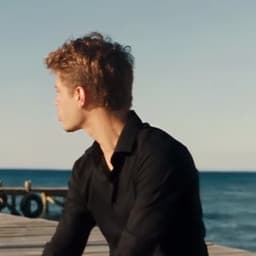
Photo 1
The one waiting
Replaces the man in black
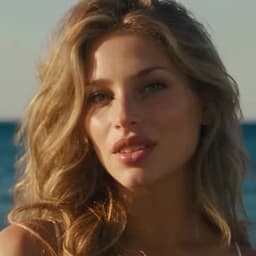
Photo 2
The singer
Replaces the woman in white
The first photo replaces the man in the black shirt who waits on the pier and takes the photo. The second replaces the woman in the white dress who sings to the camera. The roles aren't tied to gender: put whoever should sing in the second box. Each of you wears the outfit from your own photo.
What happens in the 28 seconds?
| Part | What happens | Who's on screen |
|---|---|---|
| The arrival | He turns on the pier as she walks into frame in white and starts singing to the lens | Both |
| The song | She dances along the boards and sings in close-up, the sea and the low sun behind her | Mostly the singer |
| The beach | They meet at the end of the pier, he crouches for a photo, they finish side by side on the sand | Both |
The singer carries most of the close-ups, so the second photo matters most. Pick the sharpest, best-lit photo you have for that role.
Why does Raindance AI cost more than the other tools?
Because it's the longest clip in the set: 28 seconds, nearly twice the length of most trends here. The video model edits up to 15 seconds at a time, so Raindance is recast in three parts, cut on the original shot changes, stitched back together and given back its song. You pay per second of video, which is why it costs 1,315 credits at 720p.
What photos work best for Raindance AI?
- One person per photo, face clearly visible.
- Chest up or waist up works best; the clip shows close-ups and wide shots.
- Good, even light. Golden-hour photos look great in this clip, but avoid faces in deep shadow.
- No sunglasses, unless you want them in the whole video.
- JPG, PNG or WebP, at least 341 px on each side and under 20 MB.
Why doesn't my Raindance video look right?
| Problem | Likely cause | Fix |
|---|---|---|
| Wrong person singing | Photos in the wrong order | First box waits on the pier, second box sings |
| Face changes between shots | Small or side-on face in the photo | Use a closer, front-facing photo |
| Upload rejected | Group photo, explicit image, or under 341 px | One clothed person per photo |
| Video failed | A render step failed after retries | Credits are refunded automatically; try clearer photos |
Frequently asked questions
Is Raindance AI free?
No. Raindance AI costs 1,315 credits at 720p per video, about $7.63 on the $29/month Starter plan (5,000 credits), which covers 3 videos. Credits are only taken when a video finishes; if it fails, they are returned automatically. There is no watermark on the result.
Is there a Raindance AI template?
The tool is the template: the pier clip, its cuts and the song are already loaded. You don't pick or edit anything; you add two photos.
Can I make a Raindance AI video on my phone?
Yes. Raindance AI runs in the browser, so it works on iPhone and Android without an app. Pick the photos from your camera roll, generate, and save the MP4 straight to your phone to post on TikTok, Instagram Reels or YouTube Shorts.
Does the Raindance AI video include the song?
Yes. The original soundtrack is laid over the finished video, and the singer's mouth movements stay in time with it.
How long does a Raindance AI video take to make?
Usually 5 to 10 minutes. You can close the tab while it renders; open the Raindance AI page again later and the finished video is waiting under Your recent videos.
Can two men or two women do the Raindance video?
Yes. The roles are "the one waiting" and "the singer". Anyone can take either role, and each person keeps their own look and outfit.
Can I post my Raindance AI video on TikTok or Instagram?
Yes, that is what it is made for. The video is a standard MP4 that uploads like any clip. The soundtrack still belongs to its rights holders, so keep it to personal posts; if a platform mutes the audio, add the official sound from the app's sound library instead. Don't use it in paid ads.
Can I use a photo of a celebrity or someone else?
Only photos of yourself or of people who agreed to it. Photos of celebrities, public figures or anyone who hasn't consented aren't allowed, and every photo passes automated moderation that blocks explicit images before anything is generated.
What happens to my photos?
Before upload, your browser resizes each photo and re-encodes it, which strips EXIF data including GPS location. The photos are only used to render your video.
Is Raindance AI affiliated with the artists of the song?
No. Raindance AI is an independent tool and is not affiliated with, or endorsed by, the artists or any rights holder of the song or the original video.
Make your Raindance AI video
Two photos star in the sunset pier love story.
Open Raindance AIMore AI video guides
How to Make the APT AI Video With Two Photos
Two photos become the singer and the drummer of the pink-studio APT clip. Here is exactly how, what it costs and how to get a clean result.
How to Make the Burning Bridges AI Video From One Photo
One photo takes over the walk-up, the grin and the hype. Both scenes, the exact steps and what makes a photo work.
How to Make the Hotel Lobby AI Video With Two Photos
Two photos, one hanging mic, the orange booth. How to make the Hotel Lobby duet with friends, a partner or your pet.
How to Make the AI Zombie Love Story Video With Two Photos
The barn standoff, the leap and the hug in the wheat field, starring the two of you or your pet. Steps, the shot list and photo tips.
How to Make the Rumpelstiltskin AI Haystack Dance Video
The haystack dance meme with two photos: a dancer, a witness and nine seconds of hay. The cheapest tool in the set, step by step.