How to Make the AI Zombie Love Story Video With Two Photos
Quick answer
To make the AI zombie love story video, open AI Zombie, upload two photos (the survivor who holds the gun, then the one who turns, a person or a pet), pick 16:9 or 9:16 and a resolution, and click Generate. In about 5-10 minutes you get a 15-second film with sound. It costs 250 credits at 480p or 800 credits at 1080p (from about $1.45), charged only if the video succeeds.
Open AI ZombieAI Zombie at a glance
| Video length | 15 seconds |
|---|---|
| Photos needed | 2 (the survivor, the one who turns) |
| Resolution | 480p or 1080p |
| Format | 16:9 landscape or 9:16 vertical |
| Cost | 250 credits at 480p or 800 credits at 1080p |
| Approx. price | From $1.45 on the $29/month Starter plan (5,000 credits) |
| Render time | Usually 5-10 minutes |
| Watermark | None |
| Sound | Generated: barn ambience, scream, piano and strings |
| Pets | Yes, as the one who turns |
| Gore | None: no shot fired, no blood |
What is the AI zombie love story trend?
The AI zombie love story is a 15-second cinematic short. A survivor stands in a dark barn, crying, aiming a revolver at the one they love, who has already turned into a zombie. They can't pull the trigger. The gun drops, their arms open, the zombie sprints and leaps, and mid-air the barn dissolves into a golden wheat field where the hug lands and both of them are human again.
People make it with a partner, a best friend, a sibling or, very often, their dog or cat as the one who turns. AI Zombie generates the whole film around your two photos, shot by shot, with sound.
How to make the AI zombie video, step by step
- 1
Open AI Zombie
Go to the AI Zombie page and sign in.
- 2
Upload the survivor
In the first box, add a photo of the person who holds the gun and can't pull the trigger.
- 3
Upload the one who turns
In the second box, add a photo of your partner, friend or pet, who becomes the zombie.
- 4
Choose format and resolution
Pick 16:9 for YouTube or 9:16 for TikTok and Reels, then 480p or 1080p (250 credits at 480p or 800 credits at 1080p).
- 5
Generate and download
Click Generate, wait about 5-10 minutes, then download the MP4. It comes with its own sound.
Which photo is the survivor and which one turns?
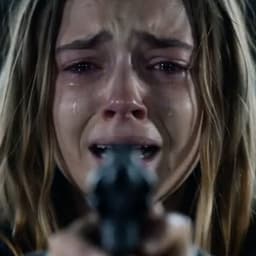
Photo 1
The survivor
Replaces the one with the gun

Photo 2
The one who turns
Replaces the zombie
The first photo is the survivor: the one crying behind the gun. The second is the one who turns: a grey-skinned, white-eyed zombie in the barn and fully human again in the wheat field. Both keep the outfit from their own photo; the zombie's is torn and dirty in the barn and clean in the field.
The AI zombie video prompt, shot by shot
If you've searched for an "AI zombie prompt", this is the structure the video follows. AI Zombie writes this script for you, timed to the frame, so you don't type anything.
| Time | Shot | What happens |
|---|---|---|
| 0-1.4 s | 1. Close-up, barn | The survivor sobs, aiming a revolver straight at the lens |
| 1.4-3 s | 2. Over the shoulder | The zombie stands hunched in the open barn doors, then steps forward |
| 3-4.4 s | 3. Medium, front | The survivor between two barn windows, arms out, the gun trembling |
| 4.4-5.4 s | 4. Extreme close-up | The zombie's face: white eyes, grey cracked skin, a snarling scream |
| 5.4-6.5 s | 5. Close-up | The survivor squeezes their eyes shut, unable to shoot |
| 6.5-8.75 s | 6. Medium, front | The gun drops to the floor; arms open wide for a hug |
| 8.75-10.1 s | 7. Wide, side | The zombie sprints across the barn and leaps |
| 10.1-10.3 s | 8. Dissolve | Mid-leap, the barn dissolves into the field |
| 10.3-13.6 s | 9. Wheat field | Human again, they land in each other's arms at sunset |
| 13.6-15 s | 10. Extreme close-up | Faces almost touching, the sun flaring between them |
Writing this yourself in a general text-to-video model is possible, but the hard part is keeping two specific faces consistent across ten shots and two forms (zombie and human). AI Zombie handles that from your photos, keeps the zombie look in every barn shot and the human look in every field shot, and adds the sound design.
Should you choose 16:9 or 9:16?
| Format | Best for | Notes |
|---|---|---|
| 16:9 landscape | YouTube, desktop, the original look | Matches the trend's cinematic framing |
| 9:16 vertical | TikTok, Instagram Reels, YouTube Shorts | Every shot is re-composed to keep both of you in frame |
Unlike the other tools, AI Zombie doesn't edit an existing clip; it directs a new film from the script, so both formats are composed natively rather than cropped. The price is the same either way.
480p or 1080p?
480p costs less and looks fine on a phone feed. 1080p gives the sharpest faces, which matters most in the extreme close-ups (shots 4 and 10). The two options cost 250 credits at 480p or 800 credits at 1080p.
How to make the AI zombie video with your dog or cat
Put your pet in the second box. In the barn it becomes a zombie version of itself, with grey patchy fur, white eyes and bared teeth, standing on all fours by the barn doors. It then sprints and leaps into the survivor's arms, healthy again in the wheat field, and the last shot is the survivor holding its face close.
- Use a sharp photo of the pet's face, facing the camera.
- Good light so the fur color and markings carry over.
- The survivor (first photo) must be a person: they hold the gun and open their arms.
What photos work best for AI Zombie?
- One person per photo, or a pet for the one who turns.
- Front-facing, with the whole head visible. The model must recognise the face as both zombie and human.
- Even light, no sunglasses or heavy filters.
- JPG, PNG or WebP, at least 341 px on each side and under 20 MB.
Frequently asked questions
Is AI Zombie free?
No. AI Zombie costs 250 credits at 480p or 800 credits at 1080p per video, about $1.45 on the $29/month Starter plan (5,000 credits), which covers 20 videos. Credits are only taken when a video finishes; if it fails, they are returned automatically. There is no watermark on the result.
Do I need to write an AI zombie prompt?
No. The shot-by-shot script is built in. You only add two photos and pick a format and resolution.
Is the AI zombie video scary or gory?
No. No shot is ever fired and there is no blood or gore. The zombie look is grey skin, white eyes and torn clothes, and the film ends on a hug in a sunny field.
Can I make a AI Zombie video on my phone?
Yes. AI Zombie runs in the browser, so it works on iPhone and Android without an app. Pick the photos from your camera roll, generate, and save the MP4 straight to your phone to post on TikTok, Instagram Reels or YouTube Shorts.
Does the AI zombie video have sound?
Yes. The sound is generated with the film: a cold barn ambience, the survivor's sobbing, the zombie's scream, then a soft piano and strings score in the wheat field. There's no dialogue and no copyrighted song, so it's safe to post anywhere.
How long does a AI Zombie video take to make?
Usually 5 to 10 minutes. You can close the tab while it renders; open the AI Zombie page again later and the finished video is waiting under Your recent videos.
Can both people be zombies?
No. The story needs one survivor and one who has turned, and that's what makes the ending land.
Can I use a photo of a celebrity or someone else?
Only photos of yourself or of people who agreed to it. Photos of celebrities, public figures or anyone who hasn't consented aren't allowed, and every photo passes automated moderation that blocks explicit images before anything is generated.
What happens to my photos?
Before upload, your browser resizes each photo and re-encodes it, which strips EXIF data including GPS location. The photos are only used to render your video.
Make your AI Zombie video
The zombie love story, starring you and your partner or pet.
Open AI ZombieMore AI video guides
How to Make the APT AI Video With Two Photos
Two photos become the singer and the drummer of the pink-studio APT clip. Here is exactly how, what it costs and how to get a clean result.
How to Make the Burning Bridges AI Video From One Photo
One photo takes over the walk-up, the grin and the hype. Both scenes, the exact steps and what makes a photo work.
How to Make the Hotel Lobby AI Video With Two Photos
Two photos, one hanging mic, the orange booth. How to make the Hotel Lobby duet with friends, a partner or your pet.
How to Make the Raindance AI Video With Two Photos
The pier, the white dress, the song and the beach at sunset, recast with two photos. Steps, roles and what makes a photo work.
How to Make the Rumpelstiltskin AI Haystack Dance Video
The haystack dance meme with two photos: a dancer, a witness and nine seconds of hay. The cheapest tool in the set, step by step.